
iBall Baton is known for its superb routers and networking products. They are used at home and professionally as well for various tasks. iBall has many wifi routers under its portfolio. The different wifi and networking products launched by iBall are:
- Broadband Routers
- Mesh Router
- 4G / 3G Routers
- ADSL Routers
- Wi-Fi Extender
- USB Adapter
The iBall iB-WRB333N 300M MIMO Wireless-N Broadband Router and the iBall Baton AC 1200 are among the most popular broadband routers by iBall.
We may often need to change the name and password of Wi-Fi due to many reasons. So, let's Understand how to change the name (SSID) and password of our iball baton.
Step 1: Open Google Chrome on your mobile browser (Google Chrome or Safari) on your phone or laptop.


Step 2: In your search bar enter this IP address 192.168.1.1. This IP address is listed on the bottom of your Wifi modem.
Step 3: After opening this site, you will be asked for the password. This password is 'admin'.

Step 4: After entering the password, the iball baton page will open on your screen. Now click on the 3 bars that you see on the top right side of this page.

Step 5: Now click on the option 'Wireless Setting' from the drop-down menu that opens.

Step 6: Now on this page, you will see your wifi name under 'SSID Name'. By clicking on it you can change the name of WiFi.

Step 7: To change the password, click on the option 'WiFi Password' and enter the new password.
If you are not able to change the password, then first disable the option of 'WPS'. Now you will be able to change your password.
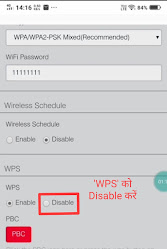
Step 8: After setting your desired name and password, click on the 'Save' button.


In this way, you will be able to change the name and password of your IBall Baton WiFi Modem in a very easy way!
It is necessary to change the Wi-Fi password regularly. Sometimes having very simple passwords makes it prone to hacking easily. That's why choosing a strong password is very important. A good password is considered to be one in which there is a combination of capital and small letters of English. Along with this, it has proved to be very important to use many types of 'Special Characters' such as ~!@#$%^&.
A technique to find out how strong your password is:
If you want to know how strong your password is, and how long it can take to hack it, then you should use this facility https://www.security.org/how-secure-is-my-password/
With the help of this site, you will be able to make your password stronger.
Some precautions related to WiFi:
We often use Wi-Fi in public places like railway stations, airports, etc. But do you know that in such places your device (mobile, laptop, etc.) is most likely to be hacked? Often we get lured by 'Free WiFi' and connect our mobile or other devices to unknown networks. If there is ever a need to connect to a public place Wi-Fi for absolutely any important work, then always use this service 'VPN'!
What is a 'VPN'?
The full meaning of 'VPN' is 'Virtual Private Network'. By using this service, you can set up a private network for yourself, so that you can easily use the Wi-Fi of that place even if you are not connected to that public network.
If you found this information helpful, then definitely subscribe to our channel PhoneinTech on YouTube.
For more such awesome posts, follow PhoneinTech for more.


![7 Best Gaming Laptops Under ₹70,000 You Should Not Miss! [JULY 2022 EDITION]](https://blogger.googleusercontent.com/img/b/R29vZ2xl/AVvXsEiGoUT33j0FDVTZrhZio9FvTxGASOSMSbMj9PRYKhpfUpXKE94GAeL-Fbk-vMQeje0MgMJkWRADV_RxR8HbCjOMKfhQ55HHpXRyu6kfKeY5SfcSJkWutAInWzMQBJN6CK3_UHtHanWjp791UVO7y2Tap9aw0JK_kuj2inmjmRm5JRe8TOhIYrUugAxmpw/w72-h72-p-k-no-nu/Yellow%20&%20Black%20Modern%20Gaming%20YouTube%20Thumbnail%20(1).png)


0 Comments